Ron Shank

Certified Rapid Results and Profit Coach

  • Home
  • Book A Meeting
  • Biography
  • FAQ
  • Media Kit
  • Calendar
  • Blog
  • Contact Us
You are here: Home / Blog

Aug 11 2026

LinkedIn Profile Optimization: Checklist & Tutorial

Your LinkedIn profile is a squeeze page. Treat it like one. Every section either moves a prospect toward booking a conversation or gives them a reason to scroll past you. This guide walks through each section using two ideas: lead with the prospect's pain, not your credentials, and follow a simple sequence, Captivate, Fascinate, Educate, Close.

You don't need to be technical to work through this. Each section tells you what to look for on your own profile and gives you plain-language wording you can copy, paste, and adjust.

Quick Checklist

☐ Banner image communicates the result, not just your logo
☐ Headline leads with the prospect's problem, not your job title
☐ Profile photo is current, professional, and approachable
☐ About section opens with pain, not biography
☐ About section ends with a single clear call to action
☐ Featured section links directly to your book, offer, or signature session
☐ Experience section describes outcomes for clients, not job duties
☐ Recommendations reflect specific results, not general praise
☐ Custom URL is clean (linkedin.com/in/yourname, no numbers)
☐ Contact info includes your booking link, not just email
☐ Posting rhythm exists and each post ends with an invitation, not a hashtag dump

Section-by-Section Tutorial

1. Banner Image (Captivate)

Business advisor designing a clean LinkedIn profile banner on a laptop

This is the first thing a visitor sees, before your photo even registers. Most people leave it blank or slap a logo on it. That's wasted real estate.

Put a short, benefit-driven statement here, spoken straight to the reader. Something like "Find six figures or more in hidden revenue in 90 minutes," or whatever the core result of your work is. Avoid your company name in giant letters. Nobody cares yet. They care about themselves first. And avoid "I help" or "we help" anywhere on the banner. Those phrases talk about you. Talk to them instead.

Recommended size: 1584 x 396 pixels. LinkedIn crops differently on desktop versus mobile, so keep your text centered rather than pushed to the edges, or it may get cut off on some screens.

Using ChatGPT to create the image:

You don't need a designer for this. ChatGPT can generate the banner image directly if you have access to image generation, which is built into ChatGPT Plus and most current versions of the free tier.

Here's how it works in plain terms: you describe what you want in a message, ChatGPT generates a few image options, and you download the one you like. You can ask for changes if the first version isn't right, just like giving feedback to a designer.

Example prompt to type into ChatGPT:

"Create a professional LinkedIn banner image, 1584 by 396 pixels, wide horizontal format. Clean and minimal design in navy blue and white. Leave open space on the left third for text I'll add later. Include a subtle abstract background pattern, nothing too busy. Should feel trustworthy and professional, not flashy."

Once you have the image, you can add your headline text on top of it using a free tool like Canva, or just ask ChatGPT to include the text directly in the image if you tell it exactly what to say.

2. Headline (Captivate)

LinkedIn gives you 220 characters. Most people use it to list a job title. That's a missed opportunity.

Weak: "Business Coach | Author | Speaker"

Also weak: "I help business owners find revenue they didn't know they had"

That second one feels better, but it's still a service statement. It's about you, not them. "I help" is close cousin to "we help," and both talk past the reader instead of grabbing them.

Strong: "Your revenue is hiding somewhere in your business. Most owners never find it."

Or lean on proof instead: "Found $2.3M in hidden revenue for 40+ business owners"

Both versions skip past your job title entirely and land on either the prospect's pain or a number that does the convincing for you. That's the difference between a title and a hook. Lead with pain or proof, never with what you do.

To edit this, look for your profile photo area. There's a pencil or edit icon near your name and title. That's where the headline lives.

3. Profile Photo

Simple rule: does it look like a real person a prospect would trust in a coffee shop conversation? Skip the corporate headshot with the fake bokeh background if it makes you look stiff. Skip the vacation photo too. Aim for warm, competent, approachable.

4. About Section (Fascinate, Educate)

Business owner reviewing a LinkedIn About section and featured content during a coaching session

This is your longest opportunity to make a case, and it's where most profiles fall apart. Don't open with a list of credentials or years of experience. Nobody's leaning in yet.

Open with the problem instead. Something your ideal client has actually said out loud. "You're working sixty hours a week and somehow the bank account doesn't show it." That's a sentence people recognize themselves in.

From there, build out the story in three moves:

Name the pain in their words, not yours

Show you understand why it happens (give the diagnosis freely)

Point to one clear next step

That next step should be a single call to action. Not three links. Not a list of everything you offer. One door to walk through. Usually that's a free resource or your signature offer.

Close with something concrete, not "feel free to reach out." Try: "Grab [your free resource] at [your website], or book a [your signature session] and I'll show you exactly where the gap is."

This section is usually found just below your headline. Look for "About" as its own block on the page, with an edit icon in the corner.

5. Featured Section (Fascinate)

This is prime visual real estate and it's usually empty or cluttered with old posts. Feature exactly what you want people to click:

Your book, guide, or lead magnet

A short video, if you have one, explaining your process

Your booking link

Three items maximum. More than that and nothing stands out. This section sits below your About block. If you don't see it, there's usually an "Add section" button where you can turn it on.

6. Experience Section (Educate)

Nobody scrolls your experience section looking for a job description. They're checking whether you've actually solved their kind of problem before.

Rewrite each role around outcomes. Instead of "Managed marketing campaigns for small business clients," try "Helped a regional retailer find $180,000 in overlooked revenue through pricing and retention fixes." Specific numbers beat vague competence every time.

7. Recommendations (Educate, Close)

Business coaching conversation focused on client results and written recommendations

A recommendation that says "great to work with" does nothing. A recommendation that says "found us $40,000 in savings we didn't know we had, in one session" does the selling for you.

Most clients want to help but freeze up when asked to write something from scratch. Make it easy by reminding them of a specific result and giving them something to react to, rather than a blank page.

Here's an example of what you might send someone:

"Hey [Name], would you mind writing a quick LinkedIn recommendation? No pressure on wording, just thinking out loud here: something like 'After working with [Your Name], we saw a 500% increase in email open rates after tweaking our messaging slightly.' That's the kind of specific result I'm hoping to capture, but feel free to rewrite it however feels true to you, or say it completely in your own words."

This does two things. It jogs their memory on the actual number, and it gives them permission to just edit your draft instead of starting cold. Most people will take the shortcut and lightly rewrite it rather than write one from scratch, which means you end up with a specific, credible recommendation instead of a vague one.

8. Custom URL

Go to your profile settings and look for "Edit public profile & URL," usually found near your profile photo. Clean it up to linkedin.com/in/yourname. A URL full of numbers looks unfinished and makes your profile harder to share in emails or on a business card.

9. Contact Info

Most people leave this as a plain email address. Add your booking link here too. Someone who's already curious enough to check your contact info is a warm click, not a cold one. Don't make them think about what to do next.

10. Posting Rhythm (Close)

Business consultant planning a consistent LinkedIn content calendar at a clean desk

A great profile with no activity looks abandoned. You don't need to post daily. You need consistency and a purpose behind each post.

Every post should end with something that invites a response. Not "thoughts?" tacked on as an afterthought. Something specific: "If this sounds familiar, I'd love to talk it through. Reply here or send me a message."

Whatever your best lead generation tool already is, whether that's interviews, case studies, or free sessions, use your posts to invite people into that conversation directly, rather than just sharing general advice and hoping someone bites.

The One Thing to Remember

Every section of your profile should answer one question for the visitor: what's in this for me? Credentials, awards, and job history answer a different question, one nobody's asking yet. Save that for after they've already decided to trust you.

Written by ronshank · Categorized: Coaching

Aug 03 2026

Scope Creep, Late Invoicing, and the 6 Other Profit Leaks Draining Your Business

Your income statement tells you what came in and what went out. It rarely tells you what quietly slipped through the cracks.

Established businesses rarely struggle because of a lack of top-line revenue. They leak cash in operational blind spots that standard accounting reports miss entirely.

Here are eight hidden profit leaks quietly draining your margins: and how to plug them.

1. Scope Creep

You deliver extra value to keep a key client happy, but nobody bills for the hours. Over a quarter, unbilled modifications erode project profitability by double digits.

2. Late Invoicing

Finishing a project and waiting two weeks to send the invoice delays cash flow. Every day an invoice sits unsent is an interest-free loan you are extending to your customer.

3. Unbilled Extra Work

Ad-hoc advisory questions answered over email or quick phone calls add up. When expertise is given away without billing mechanics behind it, margin disappears.

4. Discounting Without Concessions

Giving away price breaks to close deals without demanding faster payment terms or larger order volumes devalues your offer and instantly shrinks gross margin.

5. Idle Software and Subscriptions

Teams adopt specialized tools for single tasks, leaving recurring monthly fees active long after the project ends. Software bloat is an invisible tax on overhead.

6. Excessively Long Sales Cycles

Proposals that linger in endless revision cycles consume valuable sales bandwidth. Time spent chasing stagnant prospects is capacity stolen from high-probability revenue.

7. Manual Administrative Overhead

Highly paid team members spending hours on manual data entry or repetitive reconciliation create a massive hidden drag on operational efficiency.

8. Undervalued Retention Pricing

Legacy clients often pay grandfathered rates that no longer reflect your current service delivery costs or market value.

Stop the Bleeding

Fixing these leaks requires operational discipline, not increased marketing spend. When you optimize the existing mechanics of your business, profit expands without adding new customer acquisition costs.

The complete Pathway to Profit system, including worksheets and calculators, is available in my free book at shankcoaching.com.

Written by ronshank · Categorized: Coaching

Jul 25 2026

Sustainable Scaling: The Math of Hidden Revenue

Most business owners think their next dollar is out there somewhere, waiting to be found. Some new customer, some new ad campaign, some new market.

It's usually not out there. It's already in the building.

The Spend More to Earn More Trap

There's a pattern I see with almost every business owner before they start coaching with me. Revenue slows down, so the instinct is to spend more on marketing. It feels productive. Bigger budget, more leads, more sales. That's the theory.

Here's the problem. New leads get more expensive every year. Existing customers already trust you. They've already bought once. And most of them are sitting quietly, waiting to be asked again.

Chasing new business while ignoring the business you already earned isn't a growth strategy. It's a distraction dressed up as one.

The Database Goldmine

Here's a number worth sitting with. Most businesses have somewhere between $50,000 and $100,000 in revenue sitting untouched in their own customer list.

Not hypothetical money. Real money, tied to real names, from people who already said yes once.

Past clients. Lapsed customers. People who almost bought and never got a follow-up. That list is one of the most valuable assets in the business, and it's usually the most ignored one. Not because it doesn't work. Because reactivating it takes intention, and chasing something new always feels more urgent.

It isn't. It's just louder.

Systems vs. Luck

There are two ways to grow a business. One depends on what you can control. The other depends on what you can't.

Luck-based growth looks like a great month followed by a slow one, followed by a lucky referral that bails out the quarter. It works, sometimes. It also means nothing repeats on purpose. You're always one bad month away from panic.

A system runs whether the week feels good or not. It doesn't need motivation. It needs structure. That's the entire difference between a business that grows and a business that survives.

Predictable isn't boring. Predictable is what lets an owner actually plan.

The Practitioner's Ceiling

Here's something that surprises a lot of business owners. Being the best at what you do is often the exact thing keeping revenue stuck.

Early on, skill is the differentiator. You're good, so you get hired. But around the million-dollar mark, that stops being enough. Positioning takes over. If clients are hiring you because of your talent, you've built a job. A well-paying one, but still a job, still capped by the number of hours in a week.

Clients scale when they stop selling their skill and start selling a solution nobody else offers the same way. That shift is uncomfortable. It's also where the ceiling breaks.

Momentum That Builds Itself

A business that depends on the owner every single day isn't really a business. It's a very demanding hobby.

Real momentum doesn't come from grinding harder on a slow Tuesday to make up for it by Friday. It comes from a business that keeps moving even when the owner steps back. That's not about hustle. It's about what's built underneath the hustle, the systems, the offers, the follow-up that happens whether anyone remembers to do it manually or not.

Where This Leaves You

None of this is about working harder. It's about noticing where revenue is already sitting, unclaimed, and building something that doesn't require you to personally push every deal across the line.

I wrote about this in more depth in my book, Rapid Results. It's free at shankcoaching.com if you want to go further than a blog post can take you.

But you don't need the book to start. You just need to get curious. Where might your own hidden revenue be sitting right now?

Written by ronshank · Categorized: Coaching

Jul 17 2026

It’s Not a Motivation Problem. It’s a Systems Problem.

"Systems permit ordinary people to achieve extraordinary results predictably." : Michael E. Gerber

It’s Friday afternoon. For many business owners, this is the time of week when the "running on fumes" feeling sets in. You’ve put in sixty hours, made a thousand micro-decisions, and your brain feels like a browser with too many tabs open.

If you’re feeling burned out, your first instinct might be to question your motivation. You might think you need a vacation, a pep talk, or a fresh burst of entrepreneurial "hustle."

That’s rarely true.

If you’ve already built a million-dollar business, motivation isn't your problem. You wouldn't have reached this level without an extraordinary amount of it. The wall you’re hitting isn't a lack of desire; it’s a lack of structure.

You don't have a motivation problem. You have a systems problem.

The Myth that Burning Out Means You Aren't Working Hard Enough

In the early days of a business, heroic effort is a requirement. You are the sales department, the delivery team, and the janitor. You win through sheer willpower.

But what gets you to $1 million is rarely what gets you to $5 million.

Many successful entrepreneurs believe that if they are stressed, they just need to "grind" through it. They assume that burning out is a sign that they aren't tough enough or that they've lost their edge.

In reality, burning out is often a sign of high-functioning inefficiency. You are working incredibly hard to keep a manual machine running. When you rely on personal effort rather than organizational systems, you aren't building an asset: you’re building a job that you can't quit.

Why Successful Entrepreneurs Hit the "Manual Wall"

When a business grows, complexity doesn't increase linearly; it increases exponentially. More customers mean more service tickets, more staff mean more management overhead, and more revenue means more financial risk.

If you are still managing the business using the same manual methods you used at $200k, you will eventually hit the "Manual Wall."

This is the point where your personal capacity is the primary bottleneck for the entire company. Every decision has to go through you. Every problem requires your specific "gut feeling" to solve.

This creates a business that is fragile. If you get sick, the growth stops. If you take a week off, the quality drops. At Shank Coaching, we see this most often with established owners who are tired of the "spend more to earn more" trap that kills profit margins.

Whiteboard showing a business framework pyramid

Systems Create Predictability, Not Just Efficiency

Most people think of systems as boring documents or restrictive rules that kill creativity. They view systemization as a way to "save a few minutes" on a task.

That’s a narrow view.

The real value of a system is predictability.

A system is a documented, repeatable process that produces a consistent result. When you have a system for Lead Generation, you know exactly where your next customer is coming from. When you have a system for your Closing Rate, you know exactly what your revenue will look like next month.

Systems turn a "stressful week" into a "manageable one" because they remove the unknown. You aren't guessing if things will get done; you are monitoring the machine that does them.

Accountability: The Missing Piece Most People Skip

A system on a piece of paper is just a suggestion. It only becomes a tool for growth when it is combined with accountability.

Accountability is the bridge between having a process and getting a result. It’s what ensures the systems are actually used, measured, and refined.

For the $1M+ business owner, accountability often means two things:

  1. Team Accountability: Ensuring your staff is following the standards you’ve set.
  2. Founder Accountability: Ensuring you are staying in your "Zone of Genius" and not diving back into the day-to-day firefighting that ruins the system.

Predictability comes from the system; performance comes from the accountability. Together, they give you the freedom to scale intelligently.

Business planner and tablet showing growth charts

The Difference Between Being Busy and Being Productive

It is very easy to be busy for twelve hours a day while moving the needle zero inches. We call this "active inertia."

It’s the act of doing things that feel like work: checking emails, attending unnecessary meetings, or tweaking marketing copy: instead of doing the high-leverage work that drives profit.

Productivity in a million-dollar business isn't about doing more tasks. it's about optimizing the Pathway to Profit system.

If you spend your day solving a recurring problem that should have been fixed by a system six months ago, you are being busy, not productive. You are essentially paying yourself a founder’s salary to do a technician’s job.

A Practical Framework: What Needs a System First?

When business owners realize they need systems, they often get overwhelmed and try to document everything at once. This usually leads to a pile of manuals that no one reads.

Instead, you should focus on the areas that have the highest impact on your net profit. At Shank Coaching, we use the Pathway to Profit system, which focuses on eight strategic areas.

If you aren't sure where to start, analyze these three areas first:

  1. Lead Generation & Conversion: Do you have a repeatable way to find prospects and turn them into leads without you personally "hustling" for every name?
  2. Closing Rate: Is your sales process documented so that someone other than you can close a deal with the same effectiveness?
  3. Retention & Frequency: Do you have a system that automatically stays in touch with your existing database to generate new business?

One client I worked with increased their profit by 56% in a single year just by focusing on these optimizations. We didn't increase their marketing spend by a single dollar. We simply systematized the "leaks" in their existing bucket.

Strategic business advisor reviewing documents

Moving Beyond the "Fumes"

If you are running on fumes this Friday, don't look for more motivation. Look for the gap in your structure.

The goal isn't to work more hours. The goal is to build a business that produces 100% to 300% revenue growth because the system is designed to do so, not because you are personally pushing it over the finish line.

Systems are what allow you to step away from the business without it falling apart. They are what turn a "proven concept" into a scalable enterprise.

If you’re tired of the "spend more to earn more" trap and you're ready to scale intelligently, it might be time to stop looking for more "hustle" and start looking for better systems.

If you need help tweaking your current processes or creating the systems that will actually let you scale, give Ron a call at Shank Coaching. He loves to talk about this stuff and can help you identify exactly where your revenue is being left on the table.

Visit shankcoaching.com to learn more about the Pathway to Profit system and how we help business owners find hidden revenue in their existing operations.

Written by ronshank · Categorized: Coaching

May 04 2026

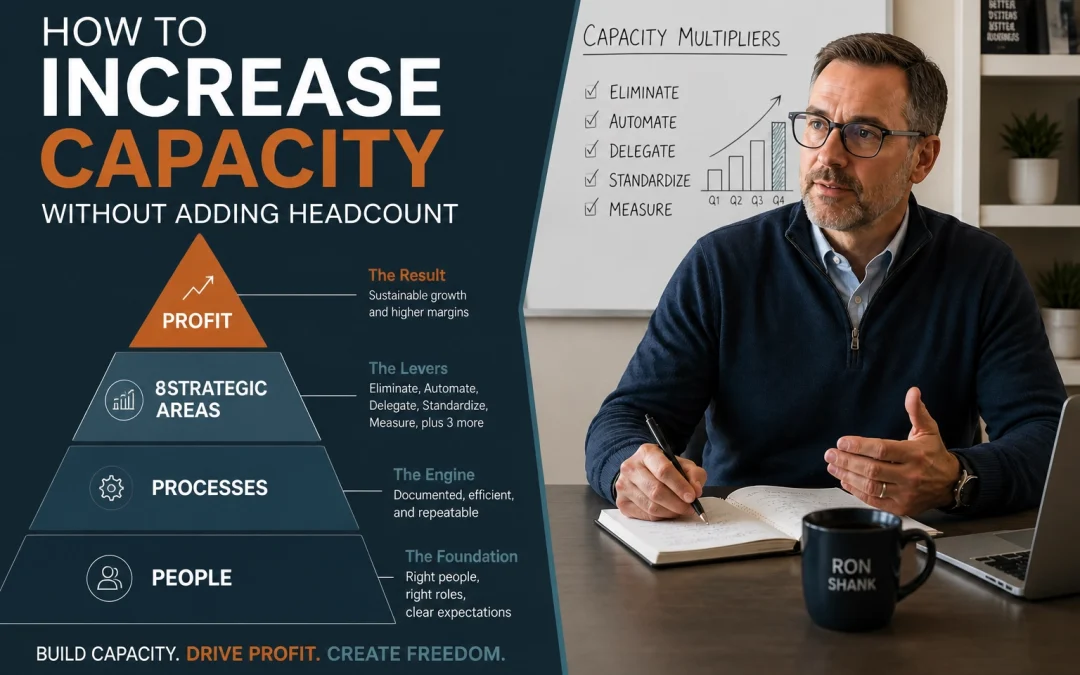
How to Increase Capacity Without Adding Headcount

Most business owners assume a capacity problem means they need more people.

That’s rarely true.

In most companies, the real issue isn’t a shortage of staff. It’s a workflow that depends on people doing work a system should be handling.

Adding payroll to fix a broken process usually increases cost faster than it increases profit. You get temporary relief, but the business gets heavier and harder to manage.

The better question is simpler. Where is work getting stuck, repeated, delayed, or dropped?

That’s where automation belongs.

Automation Is a Profit Decision

A lot of advice on this topic gets framed as a software conversation. Pick a platform. Add AI. Connect a few tools. Hope it saves time.

That misses the point entirely.

Automation is a profit optimization decision. If a process can be handled faster, more consistently, and at lower cost without sacrificing quality, it affects both capacity and margin at the same time.

This isn't about chasing a trend. It’s about deciding which work requires human judgment and which work should stop consuming expensive human hours.

Businesses that get this right don't start with tools. They start with economics.

Strategic data chart on a tablet used for calculating business capacity and profit decisions.

The Common Mistake: Hiring Before Fixing the Problem

When response times slow down or follow-up starts slipping, most owners hire to absorb the pressure. It can help in the short term. But it usually hides the actual issue.

If your team is manually writing the same follow-up messages, re-entering data, chasing scheduling gaps, or rebuilding reports every week, another hire won’t fix the design problem.

It just gives the design problem another salary.

Here is what typically happens:

• Work increases
• Manual steps pile up
• Errors increase
• Leaders hire to keep up
• Profit gets squeezed

The fix is to review the workflow before you expand payroll. Look at repetitive tasks, approval bottlenecks, handoff delays, and communication gaps.

Those are usually the first places where automation can increase capacity without increasing headcount.

Copernicus ran into this kind of problem in astronomy. People assumed the universe revolved around the earth because that was the easiest view from where they were standing.

Business owners do something similar with labor. They assume the answer is more people because that’s the easiest explanation from inside the daily chaos.

It usually isn't. Sometimes the better answer is to redesign the system around the work.

AI Breadth and Human Depth

AI is useful, but not for the reasons most people think.

Its strength is breadth. It can generate options quickly, surface variations, summarize patterns, draft alternatives, and give you multiple ways to approach the same issue.

Human leaders bring depth. They understand customer nuance, deal history, market conditions, timing, internal politics, and tradeoffs that don't show up in a prompt.

That distinction matters a lot.

AI breadth helps you produce more possible answers. Human depth helps you choose the right one.

If you're using AI inside your workflow, don't ask it to replace judgment. Use it to widen the field, reduce low-value manual work, and give the people making real decisions better inputs to work from.

For example:

• In marketing, AI can draft multiple headline options and email variations.
• In sales, AI can summarize calls and suggest follow-up language.
• In service, AI can sort support requests and draft first responses.
• In operations, AI can identify recurring delays or exceptions in a process.

The human role is still essential. Someone has to judge what fits the business, the client, and the moment.

Business coach analyzing whiteboard diagrams to balance human judgment with workflow automation.

Use the Pathway to Profit System to Find the Right Fit

Most owners ask, "What can we automate?"

A better question is, "Which part of the business is losing profit because manual work is slowing it down?"

That’s where the Pathway to Profit system earns its keep. It evaluates the business through 8 strategic areas:

  1. Lead Generation
  2. Conversion Rate
  3. Closing Rate
  4. Retention
  5. Average Dollars Per Sale
  6. Frequency of Sales
  7. Fixed Cost Reduction
  8. Variable Cost Reduction

Here is the formula we use to track progress:

Leads × Conversion Rate × Closing Rate = New Customers

(New Customers + Retained Customers) × Average Dollars Per Sale × Frequency = Revenue

Revenue – Fixed Costs – Variable Costs = Profit

Automation fits differently in each area. Here's where it can increase capacity.

Conversion Rate

If leads are coming in but too many go cold, the problem may be slow response, inconsistent follow-up, or weak qualification.

Automation can route inquiries, trigger immediate responses, schedule next steps, and keep prospects from sitting untouched for two days while everyone’s slammed. This increases your capacity to handle more leads without needing more sales assistants.

Closing Rate

If prospects are making it to sales conversations but not moving forward, review what happens between conversation and commitment.

Automation can handle proposal reminders, follow-up sequences, and task prompts so opportunities don't fall through the cracks. It keeps the salesperson focused on the conversation, not the admin.

Retention

If customers leave because communication is inconsistent or support is reactive, automation can improve the experience.

That includes onboarding sequences, check-in reminders, renewal prompts, and satisfaction surveys. You can keep the experience personal as you serve more clients without adding account managers at the same rate.

Average Dollars Per Sale and Frequency of Sales

If your team is missing cross-sell, upsell, or reorder opportunities, automation can surface them.

Triggered offers based on customer behavior play a role here. It catches revenue opportunities that get missed when no one reviews the account history in time.

Fixed and Variable Cost Reduction

Some of the best wins have nothing to do with AI or customer-facing tools. They are found in reporting, invoicing, internal approvals, and data entry.

This is recurring administrative work that quietly eats margin every week. When you automate these, you often find your current team has more capacity than you realized.

Interlocking gears representing optimized systems that increase business capacity and efficiency.

Use AI as a Red Team

Most people use AI like an intern with a keyboard. They ask it to draft content or summarize ideas.

That’s fine, but it’s not the most valuable use. A better role is "Red Team."

In military and strategic planning, a red team pressure-tests the plan. It looks for weak points, flawed assumptions, and blind spots the original team can't see.

AI can do that well if you ask the right questions. Instead of asking it to write a plan, ask it to find the reasons the plan will fail.

For example, you can ask AI to:

• Challenge the assumptions behind a hiring plan.
• Identify failure points in a customer onboarding process.
• Critique a sales script from the buyer’s perspective.
• Find objections your proposal doesn’t address.
• Stress-test a pricing change before rollout.

Most owners and leadership teams don't need more ideas. They need better filters.

Used this way, AI helps you think more clearly. It becomes less of a content engine and more of a pressure-testing tool.

You get better decisions without pretending the machine is the decision-maker.

Top-down view of business blueprints and laptop for strategic review of operational workflows.

Where to Start

Don’t begin with software demos. Start with a review of where time is being spent and where margin is being lost.

Here is a practical way to do that:

  1. List the repetitive tasks your team handles every week.
  2. Identify which tasks require judgment and which are mostly process.
  3. Map those tasks to the 8 strategic areas in the Pathway to Profit system.
  4. Estimate the cost of delay, inconsistency, and manual effort.
  5. Automate one bottleneck first and measure the result.

Keep it simple. You’re not trying to build a futuristic company over a weekend.

You’re trying to remove avoidable friction from a business that already works.

The Real Goal Is Capacity That Pays

Automation is useful when it helps the business produce more without proportionally increasing cost.

That is the goal. Not more software, not more dashboards, and not AI for the sake of saying you use it.

You want more capacity. Better consistency. Stronger profit.

If you’re solving capacity problems by defaulting to headcount, it’s probably time to step back and look at the system first.

The complete Pathway to Profit system, including worksheets and calculators, is available in my free book at shankcoaching.com.

Written by ronshank · Categorized: Coaching

  • 1
  • 2
  • 3
  • Next Page »

Copyright © 2026 Ron Shank Coaching · Web Design by OptimusMedia.com · Log in